Sync dates from Google Workspace
Confetti can read birthdays and start dates straight from your Google Workspace directory, so nobody has to type them twice and new starters are covered automatically. Setup is about five minutes for a Workspace admin. Available on Pro (and during the trial).
Before you start
- You need a Google Workspace admin account — the connection reads your directory, which regular accounts can't.
- Confetti matches people by email: a person's Google primary email must match their Slack account email.
- Google Workspace has no built-in birthday field, so Confetti reads dates from custom fields you add once. That's steps 1 and 2.
Step 1
Add two date fields to your directory
- Open admin.google.com → Directory → Users.
- Choose More options → Manage custom attributes (top right), then Add custom attribute.
- Create a category —
HRworks — with two fields of type Date:Date of birthandStart date.
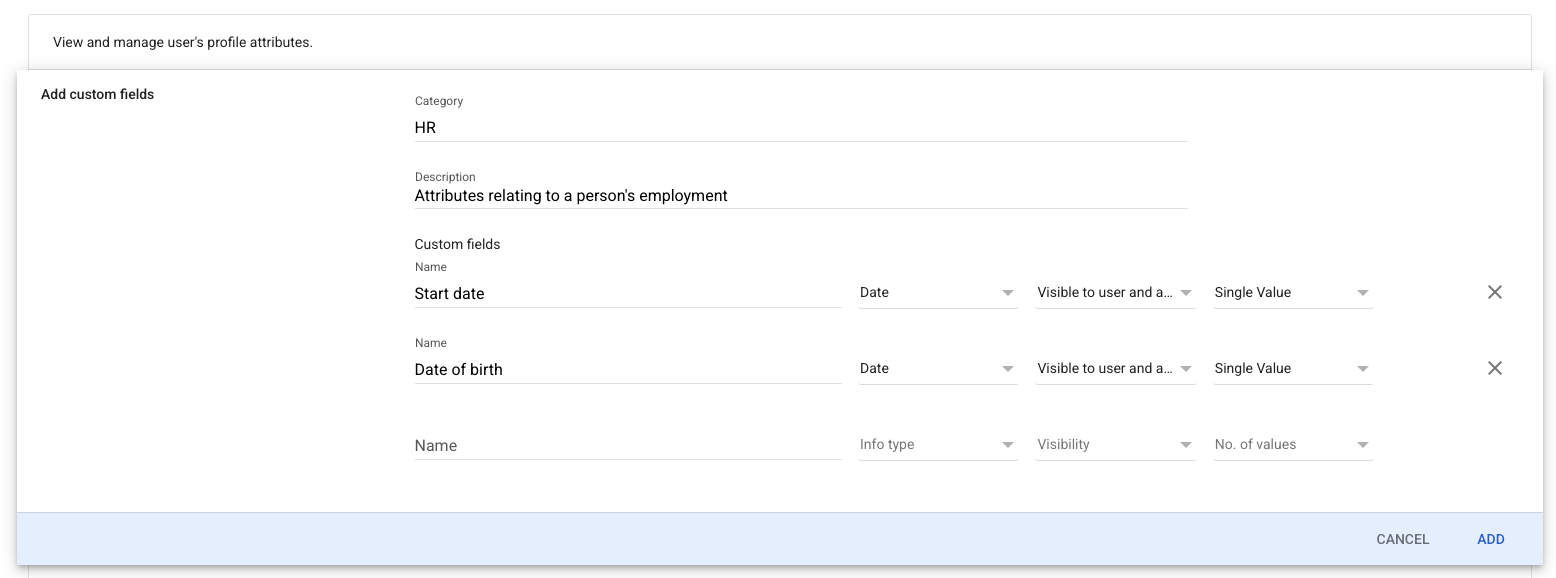
Already have fields like these from your HR tooling? Confetti recognizes any custom field whose name contains birth (or is DOB) for birthdays, and hire, start or join for anniversaries — spacing and punctuation don't matter. No renaming needed.
Step 2
Fill in the dates
Creating the fields defines them; each person's profile still needs values. In Directory → Users, open a user → User information, scroll to your new category, and enter the dates.
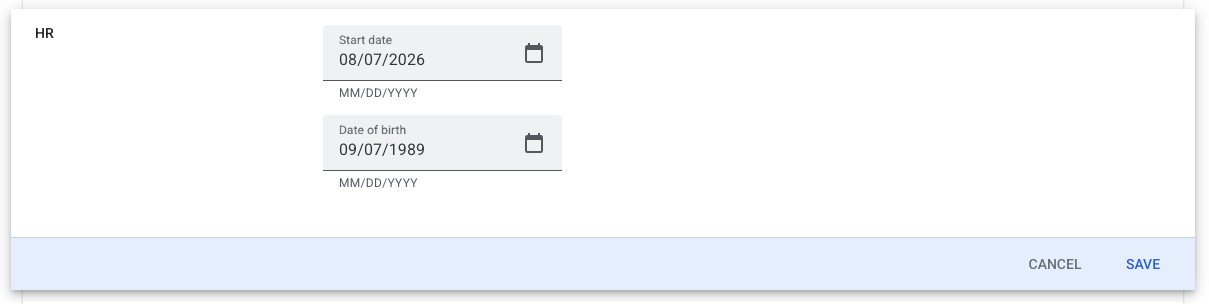
Watch the date format. Google's admin console date fields are MM/DD/YYYY regardless of your locale — 08/07/2026 means August 7, not 8 July. If you type dates rather than using the calendar picker, double-check the month comes first.
Step 3
Connect Confetti
- In Slack, open Confetti's Home tab (as a Slack admin) and click Connect Google Workspace.
- Sign in with your Google Workspace admin account and approve read-only directory access.
- The first sync runs immediately and tells you how many people were updated.
After that, Confetti re-syncs every Monday, and you can Resync now from the Home tab any time — handy right after adding dates. Disconnecting (also in the Home tab) stops syncing but keeps the dates already on your roster.
Troubleshooting
| “0 people updated” | Almost always step 2 — the fields exist but no values are filled in on the user profiles. Second most common: the person's Google primary email doesn't match their Slack email. |
|---|---|
| No anniversaries | Start dates need a full date including the year — Confetti has to know how many years to celebrate. |
| “Access revoked” message | The Google admin who connected removed Confetti's access (or left the org). Reconnect from the Home tab with any current admin account. |
| Accepted formats | 1989-09-07, 09/07/1989 (US order), or 09-07 for birthdays without a year. Date-type and text-type fields both work. |
Privacy
The connection is read-only and limited to directory user records. The Google refresh token is stored encrypted. Confetti stores only the month and day of birthdays — birth years are never taken from your directory, and ages are never shown. Start dates keep their year so milestone anniversaries can be counted. You can disconnect at any time, and uninstalling Confetti deletes the stored connection and dates within 30 days. See our Privacy Policy for the full detail.